When using Bob for selection translation on macOS, the biggest headache is often the quota and network issues of various translation APIs: DeepL has a small free quota and is easy to be flagged for risk control, OpenAI API is prone to disconnection and requires continuous payment, and traditional machine translation, although free, has poor translation quality.
Today, I’m sharing an completely free, zero-latency, highly private, and professional-quality ultimate solution: Bob + Ollama + TranslateGemma. By running Google’s TranslateGemma model locally, which is specifically optimized for translation tasks, you can achieve true “translation freedom”.
1. Core Advantages: Why TranslateGemma?
Before introducing the specific steps, let me briefly explain why this combination is the “ceiling” of current macOS translation solutions:
- Google Official Translation Fine-tuning: TranslateGemma is a Gemma model specifically fine-tuned by Google for translation tasks, supporting translation between 55 languages. Compared to general LLMs, it performs better in accuracy and elegance for multilingual translation.
- Completely Free & Offline Operation: The model runs locally, does not rely on any third-party APIs, consumes no traffic, and there is no need to worry about privacy leaks (especially suitable for translating sensitive company documents).
- Lightning Fast Response: Ollama perfectly adapts to the Metal architecture of Apple Silicon (M1/M2/M3/M4), with extremely fast inference speed, and the experience is faster than calling Gemini or ChatGPT APIs.
- Mature Ecosystem: Combined with Bob, the most powerful translation aggregation tool on macOS, it can seamlessly integrate into daily workflows (selection translation, screenshot translation, input box translation).
2. Preparation
Before you start, please ensure you have installed the following software:
- Ollama: https://ollama.com/ (for running local large models)
- Bob: https://bobtranslate.com/ A classic translation software on macOS
- Hardware Suggestions: It is recommended to use Mac devices with M1 chips and above. 8GB memory recommends using the 4b quantized version, and 16GB and above can try higher precision models.
3. Deploy TranslateGemma Model
After installing Ollama, we need to pull Google’s translation model TranslateGemma.
Open Terminal.
Run the following command to pull and run the model:
ollama run translategemma:4bTips:
translategemma:4bis the 4 billion parameter version, striking a good balance between speed and quality, suitable for most users.- If you pursue extreme effects and have sufficient memory (16GB+), you can try larger
12bor27bversions.
When you see the
>>>prompt, it means the model has been successfully loaded. You can try typing a sentence in English to see the translation effect. After testing, pressCtrl + Dto exit, and the model will be ready in the background at any time.
4. Configure Bob to Use Ollama Service
Next, we will connect the local model to Bob.
Open Bob’s Preferences.
Click Services in the left sidebar.
Click the + sign in the bottom right corner and select Ollama service to add.
Make the following key configurations:
- Name:
TranslateGemma(for easy identification) - Service Address: Keep the default
http://127.0.0.1:11434. - Model Name: Enter
translategemma:4b(must be consistent with the model name you downloaded in the terminal). - Prompt: Leave empty!
Since TranslateGemma is a dedicated translation model, unlike general dialogue models, it does not require a custom Prompt. Inputting the text to be translated directly yields the best results.
- Name:
Click “Save”.
5. Usage Effect and Advanced Tricks
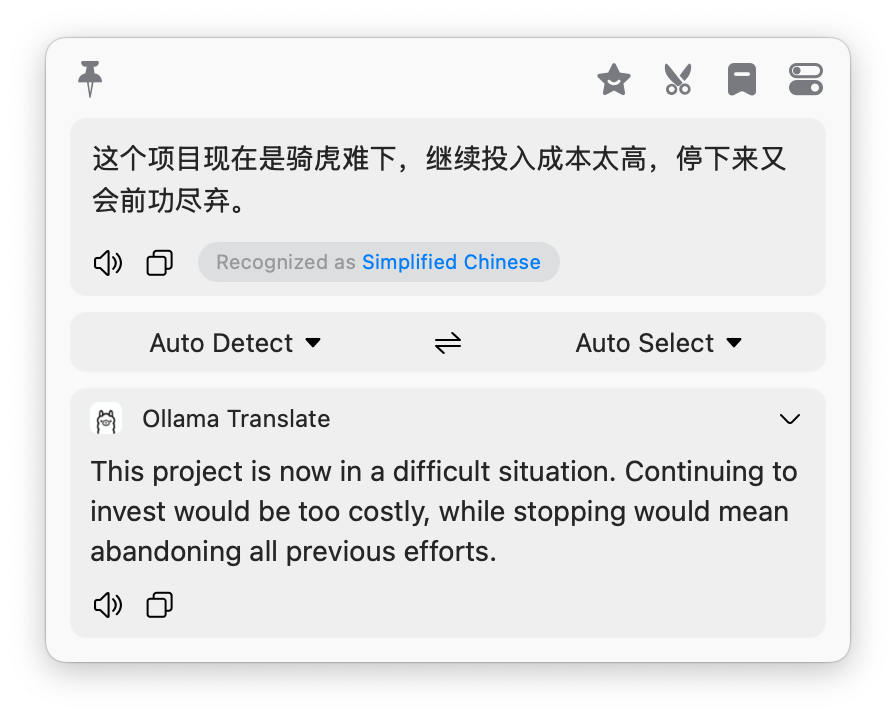
Now, select a piece of text, press Bob’s shortcut key, and you will find the translation result appears instantly.
Comparative Advantages:
- No Tone Tuning Needed: It exists naturally for translation purposes, unlike ChatGPT which sometimes rambles or explains a lot.
- Long Sentence Processing: Benefiting from Gemma’s context understanding ability, its ability to segment and reorganize technical literature and long complex sentences far exceeds traditional machine translation.
Advanced Usage: Multi-Service Routing
Although TranslateGemma does not need a Prompt, you can still use Bob’s multi-service function to configure different scenarios.
For example, you can add another general model (such as llama3 or qwen) specifically for “polishing” or “explaining words”, complementing TranslateGemma’s “pure translation” function.
6. Conclusion
Through Ollama + TranslateGemma, we not only completely get rid of API payment anxiety, but also have a private, secure, offline-available, top-quality private translator on macOS.
If you are a researcher, developer, or student who often needs to read foreign literature, I strongly recommend spending 5 minutes to deploy this solution. This may be the most elegant and efficient free translation solution on macOS currently.